• A leader in the test & measurement space
  • Audio Analyzers & Testing by Audio Precision
  • GRAS Sound and Vibration
  • imc Test & Measurement GmbH - productive testing
imc Test & Measurement GmbH
GRAS
  • Products
    Data Acquisition Systems
    • ARGUSfit - miniature
    • CRONOSflex - clickable
    • CRONOScompact - rack-based
    • CRONOS-XT - rugged & modular
    • CRONOS-SL - rugged
    • C-SERIES - small & versatile
    • SPARTAN - low-speed
    • EOS - high-speed
    • BUSDAQflex - vehicle-bus logger
    • CANSAS - CAN-based
    • Legacy Products
    Measurement Software
    • FAMOS - test data analysis
    • imc STUDIO - measurement & control operation
    • imc Online FAMOS - real-time analysis
    • imc WAVE - live NVH analysis
    • imc LINK - remote data transfer
    • imc SENSORS - sensor database
    • Legacy Products
    Sensor Solutions
    • WFT - 6-component Wheel Force Transducer
    • WTT - Wheel Torque Transducer
    • CLSx - Steering Effort Sensor
    Telemetry
    • Dx – modular telemetry system
    • MTP-NT - inductive transmission
    • CTP-NT-Rotate – compact radio telemetry
    • T1 – 16 bit single channel telemetry
    • TEL 1 –12 bit single channel telemetry
    • TEL1-Flex – bendable single channel telemetry
    Test Stands
    • Component Test Stands
    • Endurance Test Stands
    • Retrofit
    • Realized test stands
  • SOFTWARE
    • FAMOS
    • imc STUDIO
    • Online FAMOS
    • imc WAVE
    • imc LINK
  • Solutions
    Industries
    • Automotive
    • Rail
    • Aerospace
    • Energy & Power Grid
    • Mechanical Engineering
    • Civil Engineering
    E-Mobility
    • Temperature measurement in HV environments
    • Current measurement in HV environments
    • Voltage measurement in HV environments
    • Determine efficiency / power analysis
    • Testing electric motors
    • Testing driving dynamics
    • Practical examples
    • Battery test stand
    • Wireless Measurements of Rotor Temperature in E-drives
    • Back-to-Back Test Stand for Data Acquisition on Electric Motors
    Test Stands
    Noise & Vibration Analysis
    General Solutions
    • E-Mobility Applications
    • Measurement Data Analysis
    • Durability testing
    • Strain Gauge Measurements
    • imc measurement devices in the "Internet of Things"
    • Condition Monitoring
    • Fieldbus Integration
  • Resources
    imc Academy
    • About imc ACADEMY
    • Training Calendar
    • Training Programs
    • Seminars
    • Workshops
    • Digital Courses
    • Coaching & Consulting
    Tradeshows & Events
    • Sensor+Test 2026
    • Automotive Testing Expo Stuttgart 2026
    • Noise-Con 2026
    • AES Automotive Audio 2026
    • Automotive Testing Expo Shanghai 2026
    • Innotrans 2026
    • ATE North America 2026
    Webinars
    • Advancing Rail Safety: TÜV Süd & imc on Reliable M
    Product Downloads
    • Data Acquisition Systems
    • Measurement Software
    • Sensor Solutions
    • Telemetry
    • VIEW THE KNOWLEDGE CENTER
    Whitepapers
    • Mitigating damage from vibrational resonance
    • Spectrum analysis for sound power measurement
    • Mechanical power measurements on drive systems
    • From the sensor to data to added value
    • Integrated Component Test Stands
    • Ground vibration testing
    App Notes
    • Czinger 21C Safety & Durability Testing
    • Prevention of torsional vibration on wheelsets
    • imc Application Note: Liebherr BEV Mining Truck
    • Dynamic load testing of rail wheelsets
    • SBB monitors Swiss railways with imc
    • Testing Safely in High-voltage Environments
    News
    • News: E-motor test stands
    • VIEW THE KNOWLEDGE CENTER
    Press
    • Press Releases
    • VIEW THE KNOWLEDGE CENTER
  • Support
    Customer Service
    • Device Rental/Personnel Contracting
    • CE conformity
    System Service
    • Sending in a device for maintenance
    • Express Service
    About
    • Company Profile
    • CAEMAX
    • KMT
    • Jobs
    • Locations
    • General Terms & Conditions
    • Export declaration
    • Quality Assurance
    • imc Worldwide
    • Becoming a partner
    • Partner Portal
  • Contact Us
    • Contact Sales
    • General Contact
    • Become a Partner
    • Locations
    • +44 7985564945
  • English
  • Deutsch (de)
  • Chinese (Simplified)
  • South Korean
  • French
  • Hungarian
  • Chinese (Traditional) - Taiwan
  • Finnish
  • Spanish

Axiometrix Solutions Family

  • Axiometrix Solutions
  • Audio Precision
  • GRAS Sound & Vibration
  • imc Test & Measurement
  • English
  • Deutsch (de)
  • Chinese (Simplified)
  • South Korean
  • French
  • Hungarian
  • Chinese (Traditional) - Taiwan
  • Finnish
  • Spanish
LOG IN | SIGN UP
  1. Home
  2. SOFTWARE
  3. imc STUDIO

What's new in imc STUDIO 5.0?

Focus on usability

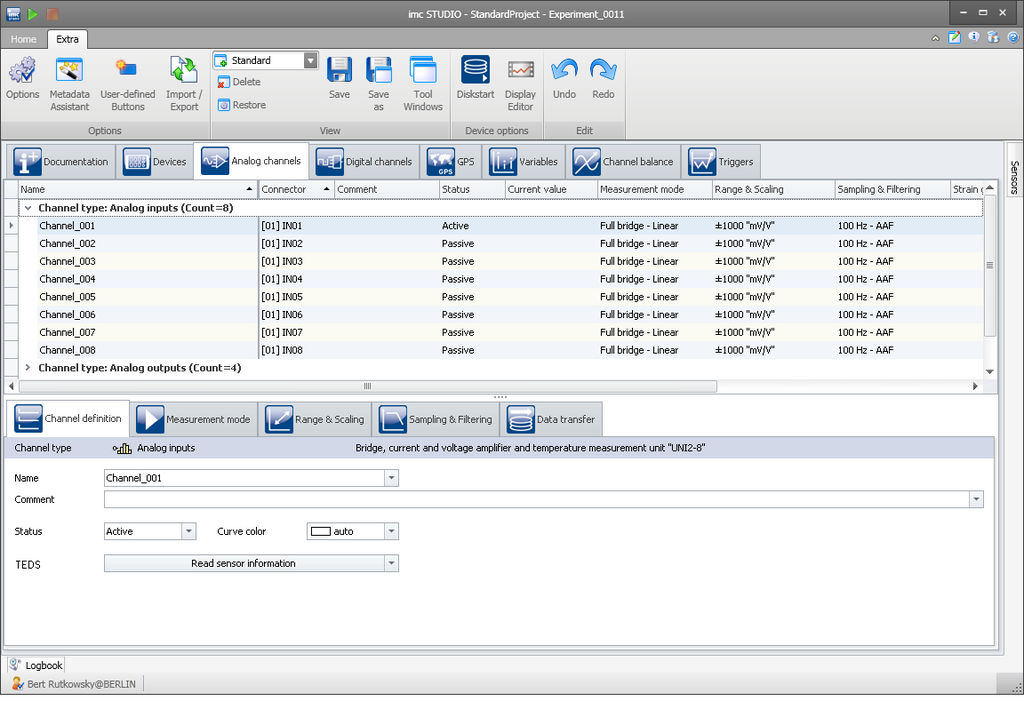
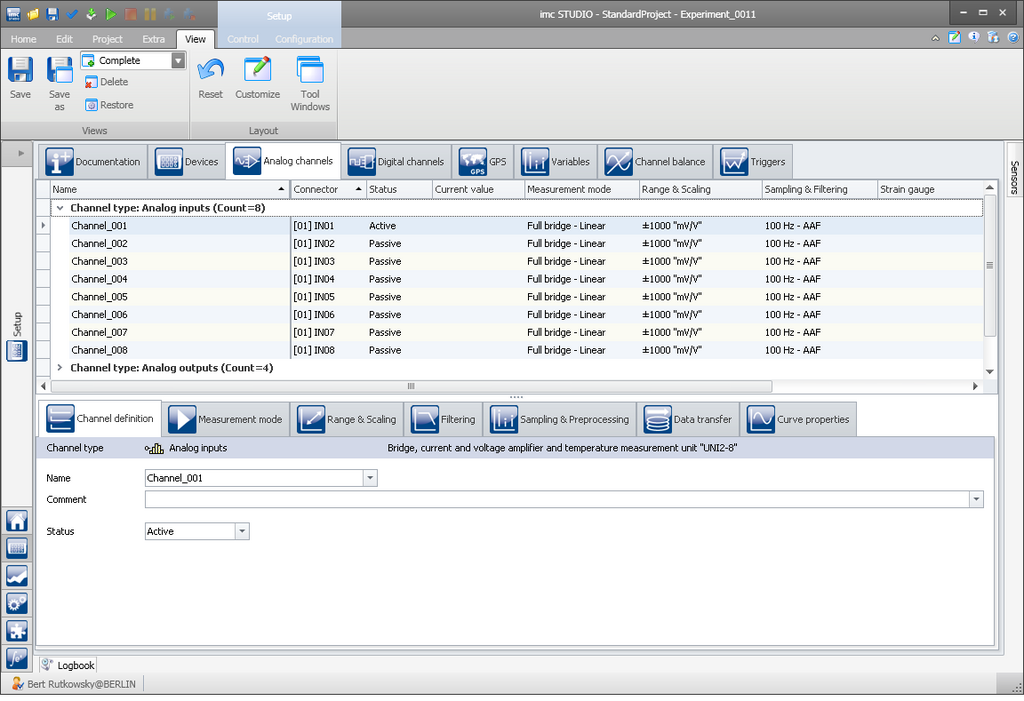
To meet varying user requirements, three new view modes are available. The “Compact” and “Standard” views are ideal for users preferring a clear and easy-to-use range of functions, although they can switch to the “Complete” expert view with one mouse-click.

test & measurement software
Selection of preferred view

1. Verbesserte Usability

Mit jeder neuen Version optimieren wir die Benutzeroberfläche von imc STUDIO: Vereinfachen Konfigurationsprozesse, arbeiten an effiziente Klickpfaden und ergänzen Kundenwünsche.
Im Ergebnis erhalten Sie die produktivste imc Messtechnik-Software: imc STUDIO 5.0 R3

Neu in 5.0 R3: Vereinfachte Netzwerk-Konfiguration von Geräten
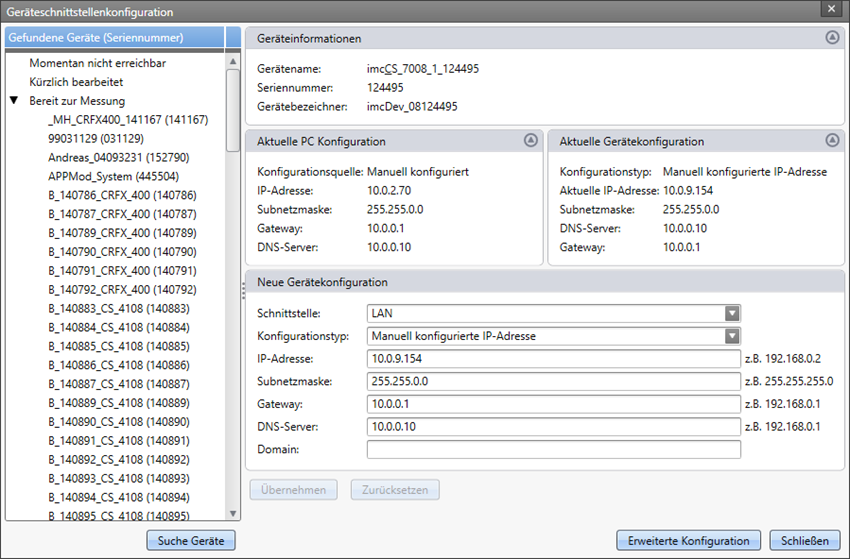
imc STUDIO Netzwerkkonfiguration von Geräte
Konfiguration der Netzwerkschnittstelle<br>direkt in imc STUDIO (ab 5.0 R3)

Die Netzwerk-Konfiguration der Geräte erfolgt nun nicht mehr über eine separate Software, sondern direkt in imc STUDIO. Zusätzlich wurde die Darstellung optimiert, so dass auf einen Blick die Netzwerk-Konfiguration des PCs und des Gerätes ersichtlich ist.
Die Geräteliste wurde in Kategorie unterteilt. So finden Sie Geräte, die auf Grund einer inkompatiblen Netzwerk-Konfiguration, nicht mit dem PC verbunden werden können, unter der Kategorie "momentan nicht erreichbar". Vor Kurzem verwendete Geräte wiederum, finden Sie in der Kategorie "kürzlich bearbeitet". 
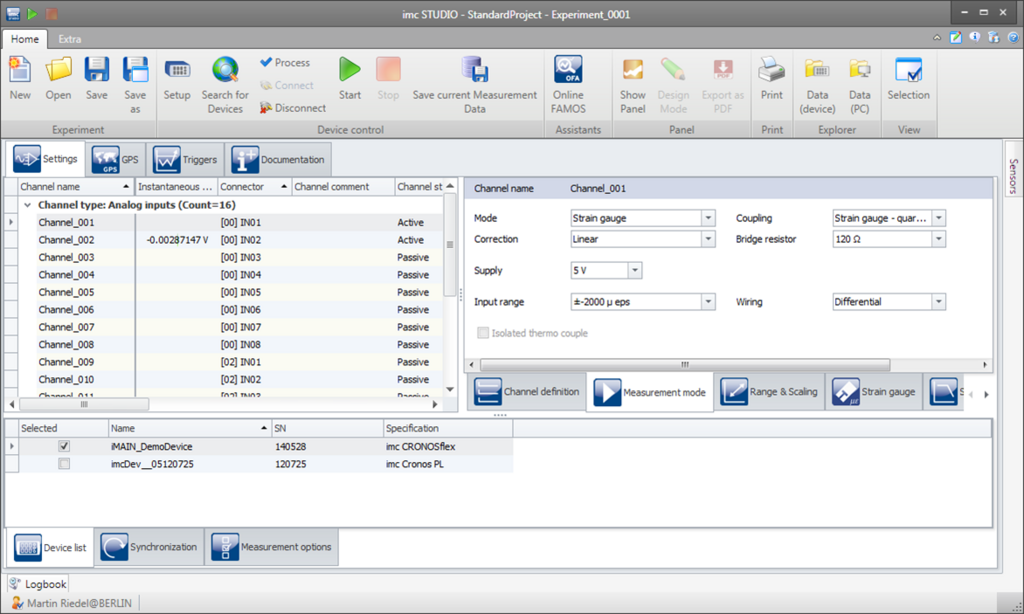
View: compact - test & measurement
View: compact
View: standard
View: standard
View: complete
View: complete

Improved assistant for channel naming
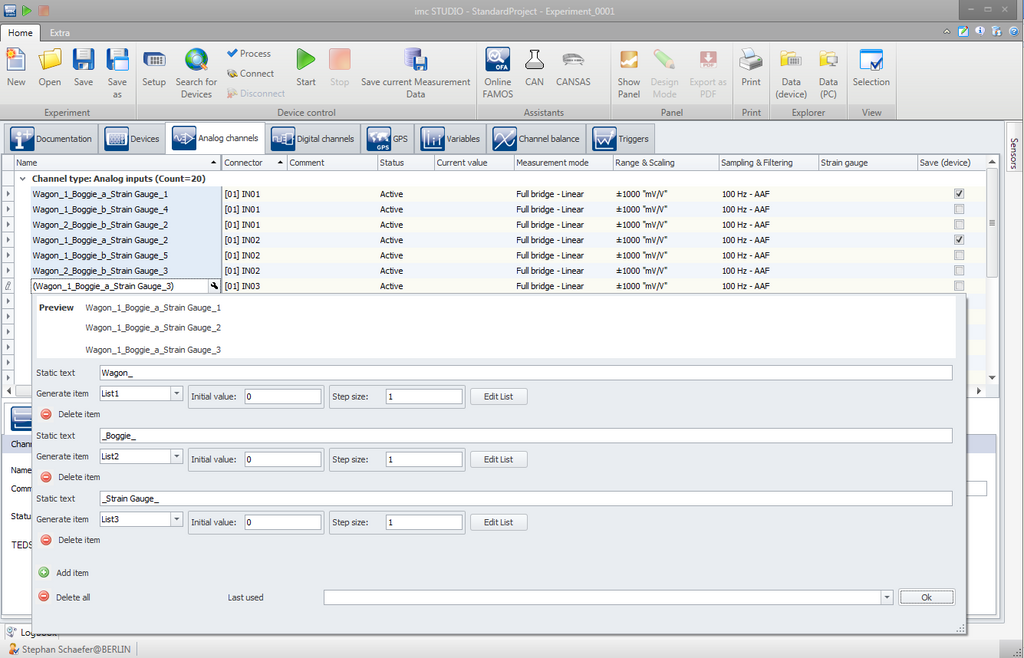
A tremendous help when handling high channel counts or large testing application, is the channel naming assistant. Options for additional system parameters, such as port number or module number, complement the naming process.

Assistant for data storage

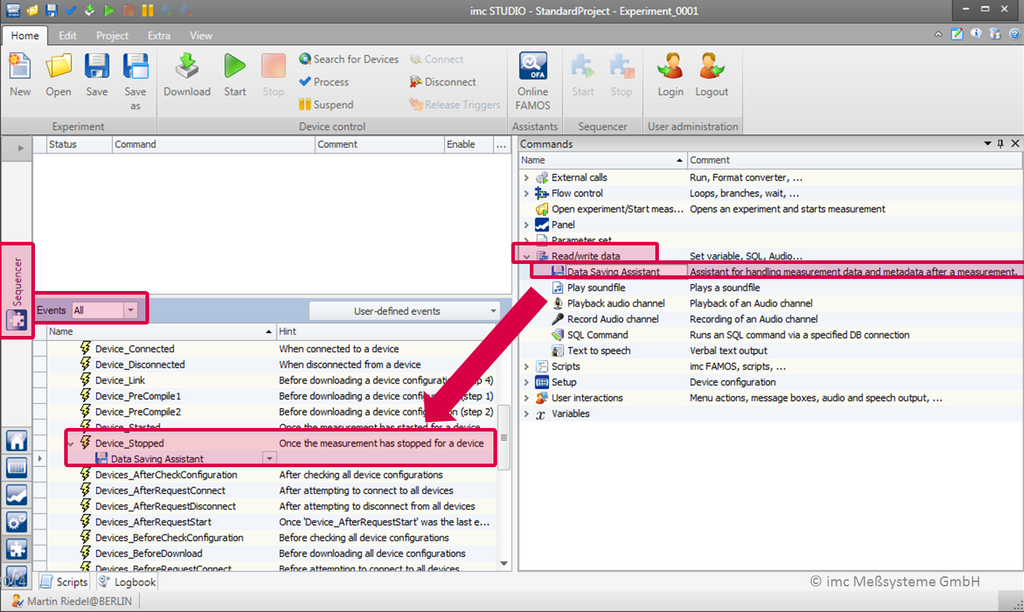
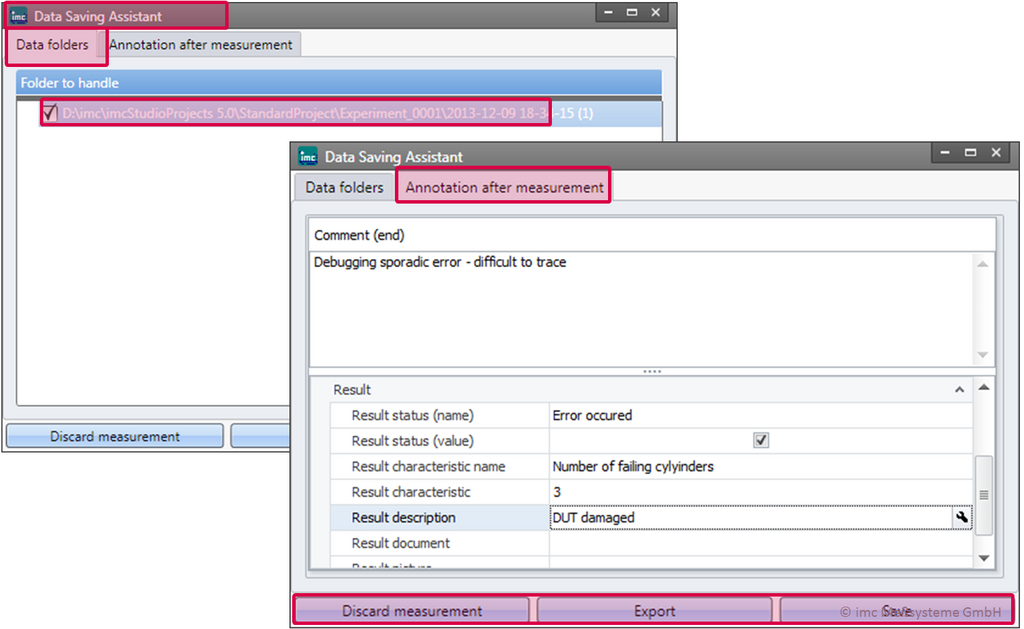
The new data storage assistant facilitates your daily measurement tasks by guiding you through the typical steps required at the end of a measurement.

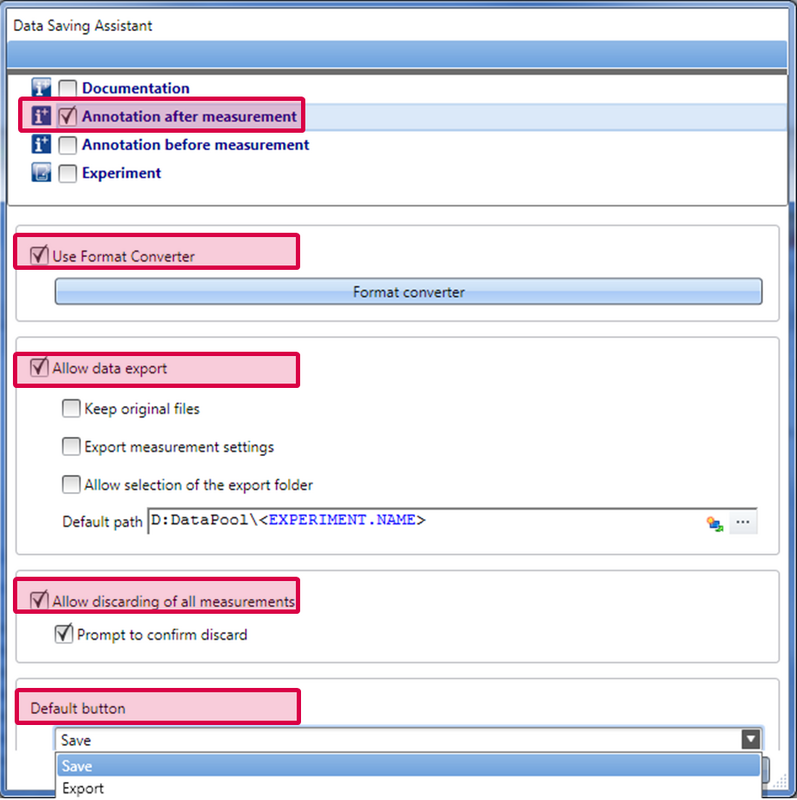
With a mouse click, you can:

  • Keep or discard your measurement
  • Save comments on the measurement
  • Convert data to another format     
  • Export data import and settings
Using the storage assistant in imc the STUDIO Sequencer
The functions of the storage assistant
Save a commentary by using the storage assistant

GPS channels

Particulary interesting for test-drive applications: imc STUDIO facilitates the organization of GPS position data and the visualization on maps. 

An exclusive, dedicated setup page for GPS positioning channels allows for efficient processes.


3. Neue Funktionen

Store data after measurement - upon push of a button
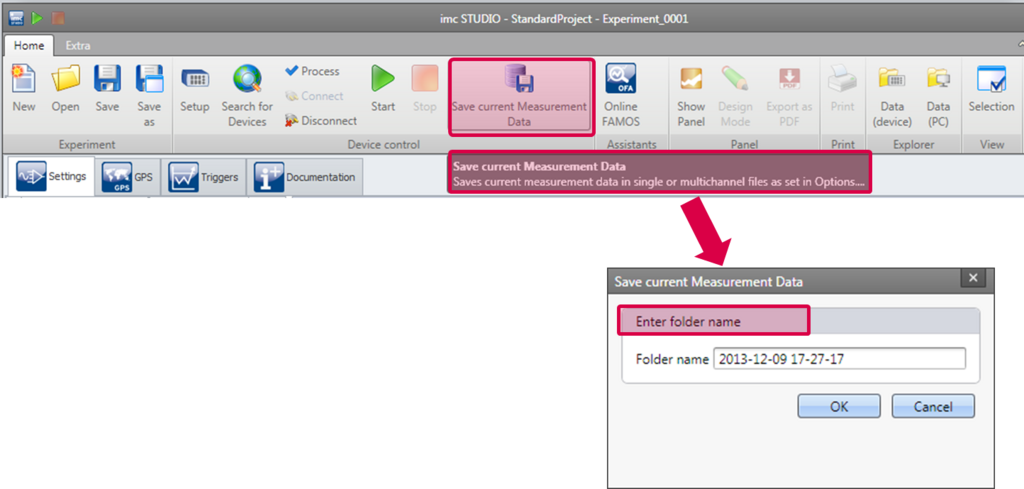
The new imc STUDIO version allows to store measurement data retrospectively from the PC-ring memory - even if you have forgotten to activate storage options when starting the measurement. By pushing the button "save data" the data is stored in a project directory of your choice.

Enhanced import and export functions

New import and export functions allow automated configuration of experiments.

You can import and export:

  • imc Online FAMOS code
  • Characteristic curves
  • Balancing values
  • Parameter sets


Assistant for Kistler Roadyn Sensor

Another area where imc STUDIO has achieved advancements is the connection of smart sensors, enabling complex measurements of driving dynamics, such as Kistler wheel force transducers (RoaDyn®), to be accessed via an interface.


4. Neue Widgets

Zeigerinstrument mit farbigen Zonen
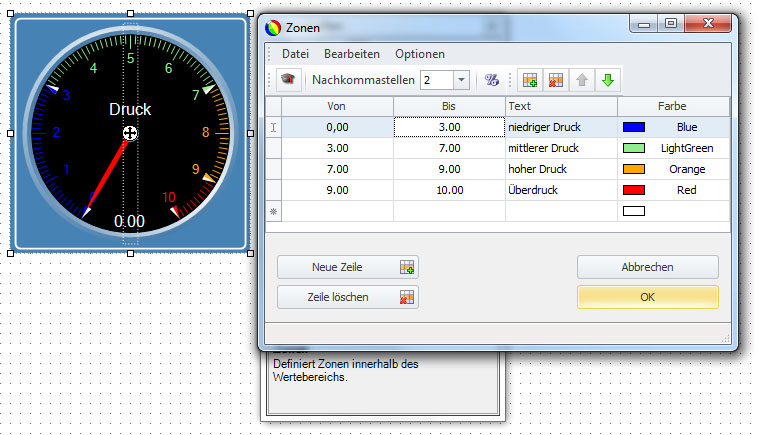
Neue Zonendarstellung im Zeigerinstrument

Das Zeigerinstrument hat nun eine einstellbare Zonendarstellung, die es erlaubt den einzelnen Zonen Farben und Texte zuzuweisen. So können Sie noch aussagekräftigere Visualisierungen entwerfen.

Alle Widgets um neue Funktionen erweitert

Alle vorhandenen Widgets sind um neue Funktionen erweitert worden:

  • Automatisches Ein- und Ausblenden von Widgets und Kurvenfenstern - so können Sie z. B. einen Reportknopf erst am Ende einer Messung anzeigen oder Kurvenfenster übereinander legen und per Knopfdruck die Sichtbarkeit umschalten.
  • Optionales Suffix „aktueller Messungsname“ am Kanalnamen
  • Definieren der Aktualisierungsrate von Widgets
  • Widgets zur numerischen Eingaben: Zahlen  können nun per Tastatur oder Mausrad verändert werden

New design elements and functions

imc STUDIO comes with attractive new features for intuitive interactive visualization, such as:

  • Zoom for panel pages
  • Change zoom level in design mode

Navi Bar

  • Replay function
  • Navigate GPS positioning data on reloadable map

Hand in hand with measurement data analysis

Ergebnisse der Berechnungen direkt mitabspeichern
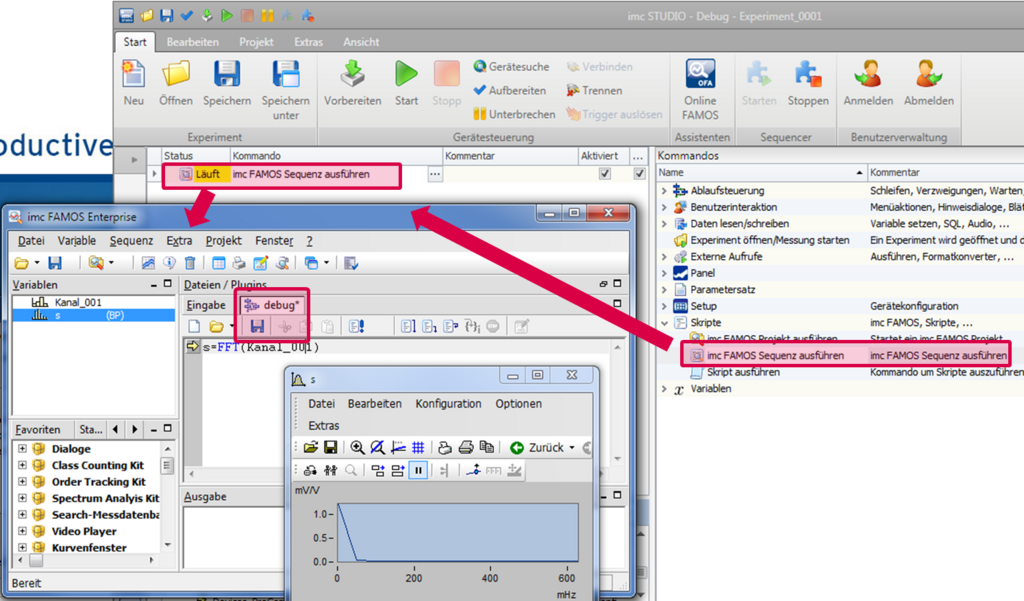
Debugging von imc FAMOS Sequenzen aus imc STUDIO heraus

The idea of integrating imc FAMOS to automate data analysis through sequences has been enhanced: by means of the new “Debug-Mode” it is possible to run these sequences step-by-step, directly with the latest measurement data. This means all interim results are available for processing and viewing, which in turn makes it significantly easier to review and develop analysis algorithms.


Multi-Monitoring

imc STUDIO Monitor allows multiple users to simultaneously view live data at multiple computer wokstations. Data can also be enhanced by meta information (i.e online commenting) and additionally stored by these distributed clients.


Integrate your own program code

A scripting interface enables application engineers to add their own program code to imc STUDIO applications.

This covers:

  • Integrating own software code into imc STUDIO  (c# with .net Framework)
  • Extending imc STUDIO with special functionalities
  • Coupled to imc STUDIO Sequencer, events and /or background scripts (imc STUDIO Panel, Exp)
  • Integrated workbench: development environment with modern editor (IntelliSense)
  • incl. access to external hardware (actuators, lab devices, test stand infrastructure, etc.)

Free Runtime Edition

A free Runtime Edition allows existing imc STUDIO applications to run at any number of work stations.

Downloads

What is new in imc STUDIO?

Broschüre

Data Acquisition Systems Measurement Software Sensor Solutions Telemetry Test Stands
FAMOS imc STUDIO imc WAVE imc LINK
FAMOS FAMOS 2026 + AI FAMOS Resources Prices & Editions Try FAMOS
Industries General Applications Automotive Applications
Knowledge Center imc Academy App Notes Whitepapers Tradeshows & Events Webinars Measurement Software News Press Export Declaration
Customer Service System Service Contact Sales General Contact Become a Partner Locations
About imc About Axiometrix Solutions Company Profile CAEMAX KMT Careers Quality Assurance Terms & Conditions Grounding Page
Axiometrix Solutions Logo negativ
imc Test & Measurement is part of Axiometrix Solutions, a leading test solutions provider comprised of globally recognized measurement brands. Productive testing is essential for the success of our customers—hence, our driving force. Since 1988 we have been committed to support industrial innovations with optimal measurement solutions. We are manufacturing our productive test and measurement systems at our headquarters in Berlin, Germany, operating worldwide in Europe, the US and Asia.

© imc Test & Measurement GmbH. All rights reserved.

Legal Notice Privacy Policy REPORT AN INCIDENT
Follow Us:
↑
Loading